
Wekelea Kenya mobile app
The Wekelea Kenya mobile app brings full betting and casino functionality to your Android or iOS device—M-Pesa deposits in under 3 minutes, live betting on KPL and Premier League matches, plus instant access to Aviator, slots, and Evolution live dealers. Download takes 2 minutes, installation requires 45MB storage, and you're placing bets within 5 minutes of opening the APK or App Store link.


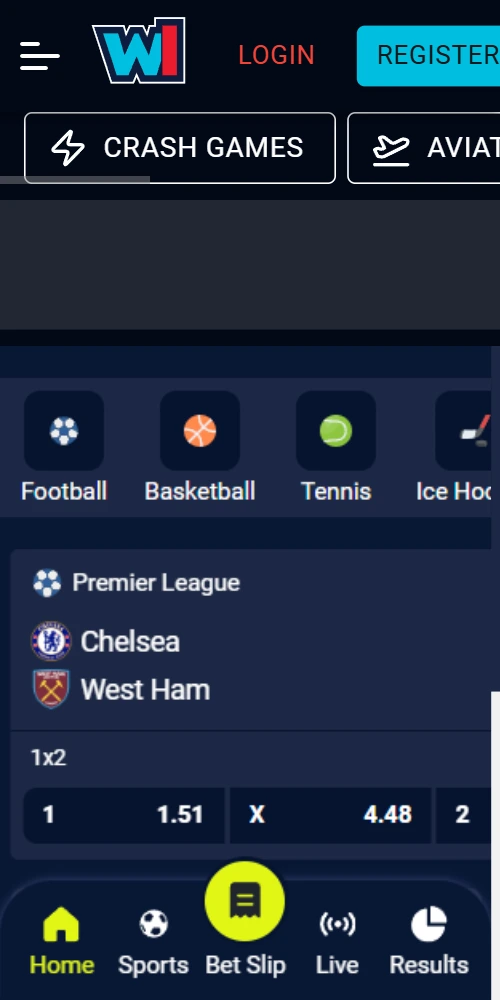
What the app delivers
The mobile app mirrors desktop functionality but loads faster on 3G/4G connections common across Nairobi, Mombasa, and upcountry networks. Push notifications alert you when your bets settle or when live matches you're tracking hit key moments—corner kicks, goals, red cards. The interface adapts to screen sizes from 4.5-inch budget Androids through to iPhone 15 Pro Max displays without losing readability.
Instant M-Pesa integration
Deposit via M-Pesa STK push without leaving the app. Funds appear in 2-4 minutes during peak hours, sometimes 90 seconds on Wednesday mornings. Withdrawals process through the same interface—request, verify via SMS code, receive money in 4-6 hours.
Live betting interface
In-play odds update every 15-30 seconds during matches. The app maintains connection even when switching between WiFi and mobile data—bets placed during the switch queue and execute once connection stabilizes. Stats panels show possession, shots, corners without opening separate screens.
Casino games optimized for mobile
Slots, crash games, and live dealer tables run through the same engine as desktop but with touch-optimized controls. Aviator's cashout button sits 30% larger on mobile for easier panic-exits during multiplier spikes. Evolution live dealer streams at 720p on 4G, dropping to 480p when signal weakens.
Push alerts for bet outcomes
Enable notifications during setup and the app pings you when accumulators settle, when cashout values hit your preset thresholds, or when matches you've bet on go live. You can mute specific alert types—some players only want jackpot notifications, others track every bet.
Offline bet slip preparation
Build your bet slip while offline (on matatus between coverage zones, for example). The app holds selections in memory and submits everything once connection returns. Odds might shift during the offline period, so check before confirming.
Biometric login support
Skip password entry after initial setup—use fingerprint or Face ID to access your account. The app stores credentials locally using device encryption. If you switch phones, you'll need to re-enter your password once on the new device.
Installation steps by platform
Android installation involves downloading an APK directly from the Wekelea Kenya website, since Google Play blocks real-money gambling apps in Kenya. iOS users get App Store access because Apple handles Kenyan betting apps differently—the app shows up in searches once you're logged into a Kenyan Apple ID.
Android setup process
Visit wekeleakenya.com on your Android browser, scroll to the bottom, punch "Download Android App". A 45MB APK file starts downloading—should complete in 30-60 seconds on 4G. Once downloaded, tap the file in your notifications panel; if you see "Installation blocked", go to Settings → Security → Unknown Sources and enable installations from your browser. Return to the APK, tap Install, wait 15-20 seconds. The Wekelea Kenya icon appears on your home screen. Open it, log in with existing credentials or create a new account directly in the app.
iOS installation walkthrough
Open App Store, search "Wekelea Kenya"—the official app appears at the top with the blue logo. Tap Get, authenticate with Face ID or password, wait for the 52MB download to finish (about 40 seconds on WiFi, 90 seconds on 4G). The app installs automatically and appears on your home screen. First launch asks for notification permissions (recommended to enable) and location access (optional, but required for BCLB compliance verification). Sign in with your existing account or register fresh.
System requirements and compatibility
Android version 6.0 or higher works, though performance improves noticeably on Android 8+. The app runs on devices with 2GB RAM minimum, but 3GB+ delivers smoother gameplay especially for live dealer tables. iOS requires version 12.0 or later—basically any iPhone from iPhone 6S onwards. Tablets work too: iPad Air 2 and newer for iOS, any Android tablet running 6.0+ with adequate RAM.
App versus mobile browser
The mobile browser version (m.wekeleakenya.com) offers identical features but loads 15-20% slower due to repeated server requests for each page. The app caches your betting history, favorite teams, and recent searches locally—returning to the sports lobby happens instantly instead of reloading. Battery consumption differs too; the browser keeps your screen active continuously, while the app allows background bet tracking with the screen off, consuming maybe 30% less power during 2-hour sessions.
| Feature | Mobile App | Mobile Browser |
|---|---|---|
| Loading speed | Instant after first launch | 2-3 seconds per page |
| Offline bet slip | Yes, holds selections | No, requires connection |
| Push notifications | Yes, customizable | No native support |
| Biometric login | Fingerprint & Face ID | Password only |
| Data consumption (2hr session) | ~25MB | ~40MB |
| Storage required | 45MB (Android), 52MB (iOS) | None |
| Update frequency | Monthly via store/APK | Automatic, server-side |
| Battery impact (2hr use) | ~12% drain | ~17% drain |
For casual bettors who place 2-3 bets weekly, the browser suffices. If you're tracking live matches daily or running multiple accumulator strategies, the app's notification system and faster load times pay off. Installation takes 5 minutes total, so there's little downside to trying both and deciding based on your usage patterns.
Common installation problems
Android "Installation blocked" error
This happens when Unknown Sources remains disabled. Go Settings → Security (or Privacy on some devices) → toggle "Unknown Sources" or "Install unknown apps", select your browser, enable. Retry the APK installation.
iOS app not appearing in App Store search
Your Apple ID might be set to a non-Kenyan region. Check Settings → Apple ID → Media & Purchases → View Account → Country/Region. If it shows something other than Kenya, you'll need to change it (requires a Kenyan payment method on file) or create a new Apple ID registered to Kenya.
App crashes on launch after update
Clear the app cache first—Android: Settings → Apps → Wekelea Kenya → Storage → Clear Cache. iOS: Offload the app (Settings → General → iPhone Storage → Wekelea Kenya → Offload App), then reinstall. If crashes persist, uninstall completely and download fresh from source.
Login credentials not working in app
The app and website share the same account database, so if credentials work on desktop they should work in-app. Try password reset via "Forgot Password" in the app. If that fails, contact support via live chat—they can verify your account status and reset access within minutes.